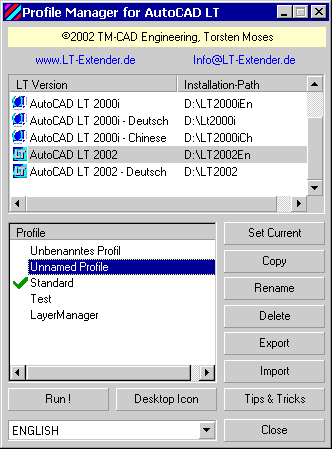
Our new FreeWare utility LT-Profiles-Manager now offers to create
and manage user-dependent and application-dependent profile for AutoCAD LT,
with all features known from AutoCAD.
LT-Profiles-Manager does not run inside AutoCAD LT, but as usual
WIndows program - this is directly caused by AutoCAD LT, which does not
offer the Profiles' Management interface API, as this is available with
AutoCAD.
There are all usual functions and options offered to manage
profiles, as available in
AutoCAD :
Set Profile current (as default profile for LT)
copy, rename, erase profiles
export, import profiles (as *.arg file)
Special features of LT-Profiles-Manager :
run LT with selected profile
create Desktop Icon for LT with marked profile
choose dialog language from popup list
"Tips & Tricks" contains notes on how to prepare Desktop Icon to use stored
( *.arg file) profiles (for
Administrators !)